I’m currently working on a task to finally get Aeolus to play nicely with OpenStack. This work has been hamstrung in the past by various other components not supporting OpenStack, and then by some quirkiness with the OpenStack server I was trying to test against. The short version is that it doesn’t work yet, but hopefully will at the end of this sprint. What follows are some notes on where things stand right now.
If you’re on F16, you’ll need to gem install openstack, and then update to something newer than the 0.5.0-10 build of Deltacloud that’s in the Fedora repos. Fedora 17 has a new enough Deltacloud (it’s at 1.0.0-8 right now), but you still need to gem install openstack.
Marios has an excellent post from February (!) on using Deltacloud with OpenStack. This provided some clues I needed to get this running.
Right now, I had to start Deltacloud manually, with: deltacloudd -i openstack -P http://192.168.1.75:5000/v2.0 for this to work. -i openstack loads the OpenStack driver, and -P http://192.168.1.75:5000/v2.0 points Deltacloud to the OpenStack authentication URL. This corresponds to the OS_AUTH_URL value that may be created by an admin.
From there, you should be able to add the provider to Conductor:
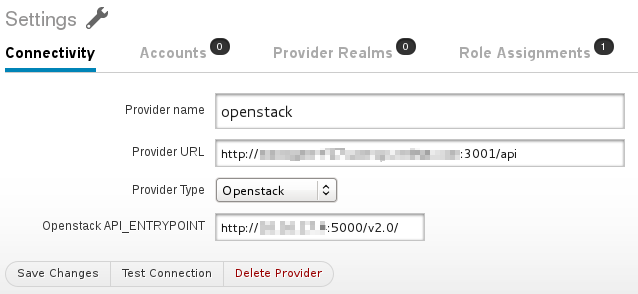
(Out of abundant paranoia I have blurred some internal IPs and hostnames, even though they’re not necessarily sensitive information.)
That screenshot leaves me wanting to clarify some of these fields in Conductor. “Provider URL” is the usual Deltacloud URL. (I just happen to be running it in a non-standard way.) I wish the text would indicate this. “Openstack API_ENTRYPOINT” is, well, the OpenStack API entrypoint, but I’d love to find a friendly name for this. This value also happens to be the exact same thing you passed in the -P flag to Deltacloud, which doesn’t seem as DRY as it could be, though I’m not sure if we can effectively share it between Deltacloud and Conductor.
Now, onto adding a Provider Account! This part is going to need some work.
As Marios mentions, OpenStack’s “v2” authentication actaully requires three fields — a tenant name, a username, and a password. For Deltacloud, you need to combine your username and tenant name with a ‘+’, e.g., “matt+mytenantname” and then enter your password normally. Today, you need to do this in the Provider Account screen. I intend to break these fields out in Conductor, though, so you enter the three fields normally.
Presently, this is as far as I can get because of BZ #858030, in which we reject hardware profiles that define “0 GB” of storage, as many OpenStack setups seem to do. I will send a (trivial) patch for that, though.
This is our current progress. After this, I’d like to move onto the real stuff — importing and building images, and launching instances!